
Create a Microsoft 365 Exchange Online connector

Configuring Microsoft 365 Connector for Web Server Email Relay

Use this summary to successfully configure a Microsoft 365 Exchange Online connector to relay email from a cPanel web server.

Some web server applications might not be equipped to connect to Microsoft 365 to relay email from your web server If you use Multifactor Authentication (MFA) to login to your email and 365 services.

Instead, an Exchange Online connector recognizes your web server as a legitimate mail server within your Micrsosoft 365 email environment. This means that a properly configured Exchange online connector relays email via Microsoft 365 to recipients without having to deal with MFA.

This article shows you how to configure an Exchange Online connector in Microsoft 365 to accept incoming traffic from your web server on port 25 using TLS. This assumes that your web server application, such as Clientexec, is:

  • properly configured to send email using SMTP on port 25.
  • your web server’s email routing configuration is established for “remote mailer”.
  • your web server uses a static IP address
    • in our default web server congiuration, you will need to contact us to arrange an IP address, which is subject to annually renewable cost.

Click open the headers below to find out more about how you can properly configure your Microsoft Exchange connector on your server.

1. Verify proper admin privileges in 365

Before you create an Exchange online connector, make sure your Microsoft 365 admin account has the correct permissions, even if you are already a Global Administrator:

  • Go to Microsoft 365 Admin Center > Roles > Admin Roles
  • Assign your account, or the user you want to authorize  to <Organization Management> if not already enabled

To add your user account to Organization Management role, click open Organization Management and add your user account. If you belong to a group, you can add that group to this role too.

 

365 admin roles - organization management

This role is required to access and configure TLS settings in connectors. Without this role, TLS options may be hidden even in the new Exchange Admin Center.

2. Access the New Exchange Admin Center

Use the Microsoft 365’s modern interface to create and edit an Exchange Online connector:

Note:  be sure you are logged in to the new Exchange Admin Center. The legacy admin center will not support the options you need. Log into the new Exchange admin centre for managing roles and mailflow > connectors. You can tell by checking that the path in your browser navigation bar includes the link above.

3. Create a New Connector

Use these settings:

  • From: Partner organization
  • To: Microsoft 365
  • Purpose: Accept email from your web server

Important configuration steps:

  • Connector Type: Must be set to Partner (not Internal)
  • Sender IP Address: Add your web server’s public IP address
  • TLS settings:
    • Require TLS: Must be checked
    • Require that the subject name of the certificate matches this domain name: Must be checked
    • the domain name you enter must also be registered in your Microsoft 365 tenancy.
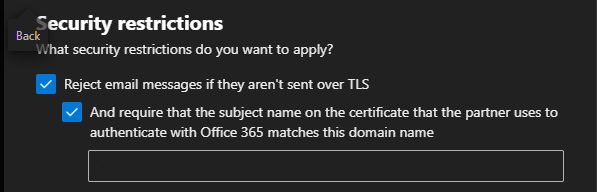
Exchange Online connector TLS setting

If you do not see these TLS preferences, you either have insufficient privileges, or you have chosen the wrong type of connector

The last preference enforces certificate validation during an SMTP handshake

4. Testing the Connector from the Web Server

Verify DNS and SMTP Connectivity

On your web server, use teh Linux “dig command to confirm mailflow routing using SSH or cPanel’s terminal. This demonstrates that by showing a Microsoft IP address in output, the outgoing message is not intercepted by Exim or other processes on your web server.

# Check MX records
dig “yourdomainname.com” MX

Use openSSL to confirm TLS handshake with SMTP server with SSH or terminal. You may need to llok up your mailhost in 365. Usually it looks like “yourdomainname-com” rather than “yourdomainname.com”

openssl s_client -starttls smtp -connect “yourmailhost”.mail.protection.outlook.com:25

Send a test email via PHP using a script like:

$to = “insert valid 365 email address”;
$subject = “Test Email from Web Server”;
$message = “This is a test message.”;
$headers = “From: insert email address”;

if (mail($to, $subject, $message, $headers)) {
echo “Email sent successfully.”;
} else {
echo “Email sending failed.”;
}

Use different From: and To: addresses to avoid spoofing or loopback issues. Also, this can be saved as a script, uploaded to public_html on your web server, and run via a browser by pointing yout browser to the php file you have saved. Delete the file after testing.

5. Verify Connector Status with PowerShell

.Use Windows PowerShell 5.1 with the Exchange Online Management Module. Powershell 7.x does not currently carry the inventory of commandlets used for Exchange Online that v5.1 supports. If you are not familiar with Powershell, find help on checking and enabling “ExecutionPolicy” to enable scripts to run. Also, you may need to install a module called Connect-ExchangeOnline.


# Connect with MFA
Connect-ExchangeOnline -UserPrincipalName youradmin@yourdomain.com
# List connectors
Get-InboundConnector | Format-Table Name, ConnectorType, Enabled, RequireTLS, TlsSenderCertificateName
# Detailed view
Get-InboundConnector -Identity “YourConnectorName” | FL Name, ConnectorType, Enabled, RequireTLS, TlsSenderCertificateName, SenderDomains
6. Understand Sent Items Behavior

Emails sent via the connector:

  • Do not appear in Sent Items of the mailbox listed in the From: field
  • Are treated as externally relayed messages, not user-initiated
Summary

Microsoft 365 connectors are powerful but require

  • properly configured 365 admin roles
  • TLS enforcement
  • Correct connector type and IP configuration
  • Careful testing from the sending server

About ComStat.uk: Internet Service Provider Comstat provides IT support, web hosting, and media services including website design, Microsoft 365 setup, and audio/video production, serving businesses across Denbighshire, North Wales and Wirral from Ruthin, and Lancashire and the Northwest from Bolton.
Email Management in cPanel: Save Space, Cut Costs, and Go Green

Introduction

Managing your ageing email is about more than keeping your inbox tidy — it is also about saving money and reducing your environmental impact. With a few simple habits and smart settings, you can keep your email system running smoothly while helping datacenters use less energy.

Click open the headers below to find out how you and your staff can control email storage at a user level.

Why Email Storage Matters

Every email stored on a server uses energy. Whether it is a short message or a large attachment, it takes power to keep that data alive. Multiply that by millions of users, and the energy cost becomes significant.

Storage means power consumption

Datacenters consume a growing share of global electricity use. For instance, according to a 2024 report by the U.S. Department of Energy (DOE), US datacenters are expected to reach up to 12% of the national power supply by 2028 in the United States. Datacenter power consumptions is predicted to increase similarly in developed nations.

Best Practices for Managing Mailboxes

To keep your email system efficient, you and your staff can follow these tips:

  • Set sensible quotas: Assign mailbox limits between 500MB and 2GB for regular users. Heavy users may need more, but limits help prevent overload.
  • Monitor usage: Use cPanel’s “Disk Usage” tool to track mailbox sizes and spot accounts that need cleanup.
  • Clean regularly: Delete old messages, empty spam and trash folders, and remove large attachments.
  • Use filters and forwarders: Set up rules to manage incoming mail and forward messages to reduce clutter.
  • Send links: sending links to files in OneDrive, Dropbox, and Google Drive avoids file duplication, reduces mailbox size, and relieves network congestion.

User-level vs organizational level management

These tips above are aimed at user level management. GDPR-compliant businesses use archiving and “rules-based” policies to control email storage. Also, GDPR-compliant businesses exercise controls to prevent indiscriminate or malicious email deletion. So, even if you are a small organization, you should have a written policy to set out management procedures.

Email archiving

Microsoft 365 excels at archiving an rules-based managment and it is the email service of choice for “mailflow”, archving, and advanced functions like litigation locks. cPanel web servers can still achieve good housekeeping results. Admins can manage email accounts centrally. Also, users can:

  • Manually move old emails to archive folders.
  • Use an email client like Outlook or Thunderbird to automate archiving.
  • Admins and ComStat.uk can provide custom scripts or cron jobs to archive or delete old emails based on age.

If you are a cPanel web server admin, you can refer to this article for more information about your cPanel email service.

Small Habits, Big Impact

Individual users can make a real difference by:

  • Unsubscribing from unwanted newsletters and mailing lists.
  • Monitoring spam and deleting it promptly.
  • Avoiding digital hoarding—don’t keep every email forever.

Regular attention like this reduce the load on servers, cuts energy use, and helps data centers operate more sustainably.

Summary

Managing email storage is more than just good housekeeping — it is a step toward better performance, lower costs, and a greener internet. In reality, cleaning up your email might not save that much energy. However, if you left all your snail mail on the kitchen table for 15 or 20 years, you would have a mess to sort out. By setting limits, cleaning mailboxes regularly, and adopting smart habits, you can do your part to keep your inbox—and the planet—healthy.

About ComStat.uk: Internet Service Provider Comstat provides IT support, web hosting, and media services including website design, Microsoft 365 setup, and audio/video production, serving businesses across Denbighshire, North Wales and Wirral from Ruthin, and Lancashire and the Northwest from Bolton.
Schedule your social media posts with Social Bee

Automate your social media management

Social Bee, available via your web server’s cPanel dashboard, helps you post your social messages at scale across platforms like Facebook, Instagram, Linkedin, YouTube and more to save save time and improve your brand’s online presence.

Click open the headers below to find out more about how you can reduce overheads with Social Bee to schedule and post your content across multiple platforms.

What Is Social Bee?

    Social Bee is a social media management tool. It lets you schedule posts, manage content, and track performance—all from one place. If your business uses Facebook, LinkedIn, Twitter, or Instagram, Social Bee helps you stay active without logging into each site to manually organise posts.

    You do not need to be tech-savvy to use tools like this. Social Bee works directly from your cPanel dashboard. That means no extra software, no complicated setup, and no need for IT support. Instead, you can manage social media messaging with Social Bee to automate posts on social platforms like:

    • Facebook
    • Instagram
    • Threads
    • X
    • LinkedIn
    • Pinterest
    • TikTok
    • YouTube
    • Google Business Profile
    • Bluesky
    Why Use Social Bee?

    Social Bee is available as a standalone subscription. However, by integrating the platform through your cPanel web hosting portal, you can:

    • Share content on multiple networks at once
    • Schedule posts in advance
    • Re-use “evergreen” posts to keep your feed fresh
    • See what works and improve your strategy with analytics

    These features help you maintain a consistent online presence. This is important for building trust and attracting customers.

    Easy Access via cPanel

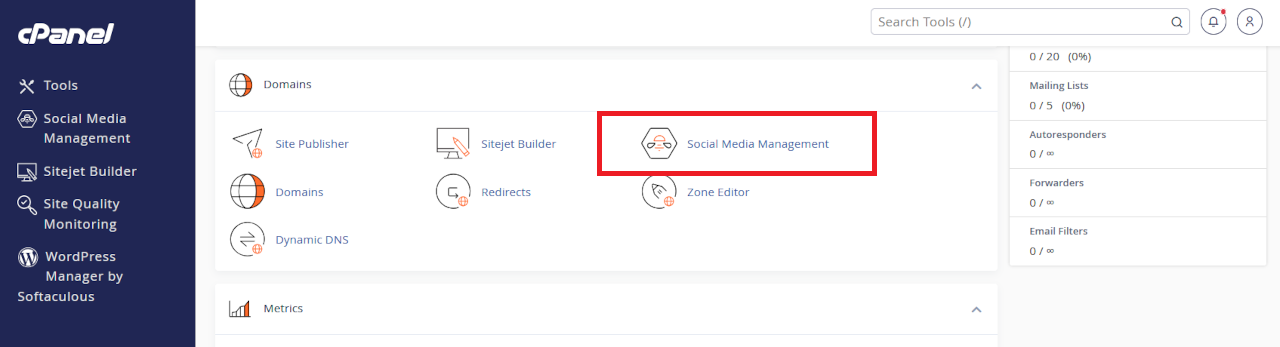
    Social Bee is already available through your web server’s cPanel dashboard, which is the control panel you use to manage your web hosting. Navigate to <Domains>, click on Social Media Management, and set up your account. After setting up your Social Bee account, log in to your server’s cPanel dashboard, navigate to <Domains>, click on Social Media Management, and start posting.


    cpanel social media management tool

    Social Bee is integrated with your cPanel web server dashboard.

    Summary

    Social Bee is a smart choice for busy business owners. It saves time, boosts your social media reach, and improves your content quality. Best of all, it is easy to use—even if you are not an IT expert.

    Ready to simplify your social media? Try Social Bee today through your cPanel dashboard.

    About ComStat.uk: Internet Service Provider Comstat provides IT support, web hosting, and media services including website design, Microsoft 365 setup, and audio/video production, serving businesses across Denbighshire, North Wales and Wirral from Ruthin, and Lancashire and the Northwest from Bolton.

    2025 Email Security Guide for Business Owners: Avoiding Scams and Attacks

    The Hidden Dangers of Business Email in 2025

    Email remains a vital tool for business communication. But in 2025, it’s also a growing target for cybercriminals. From phishing scams to AI-powered fraud, threats are evolving fast. Let’s explore what business users need to watch out for—and how to stay safe. 

    Click on the headers below to find out more about email Inbox threats. Click on inmages to view at full-sized resolution.

    Phishing Scams: Smarter, Sharper, and More Targeted

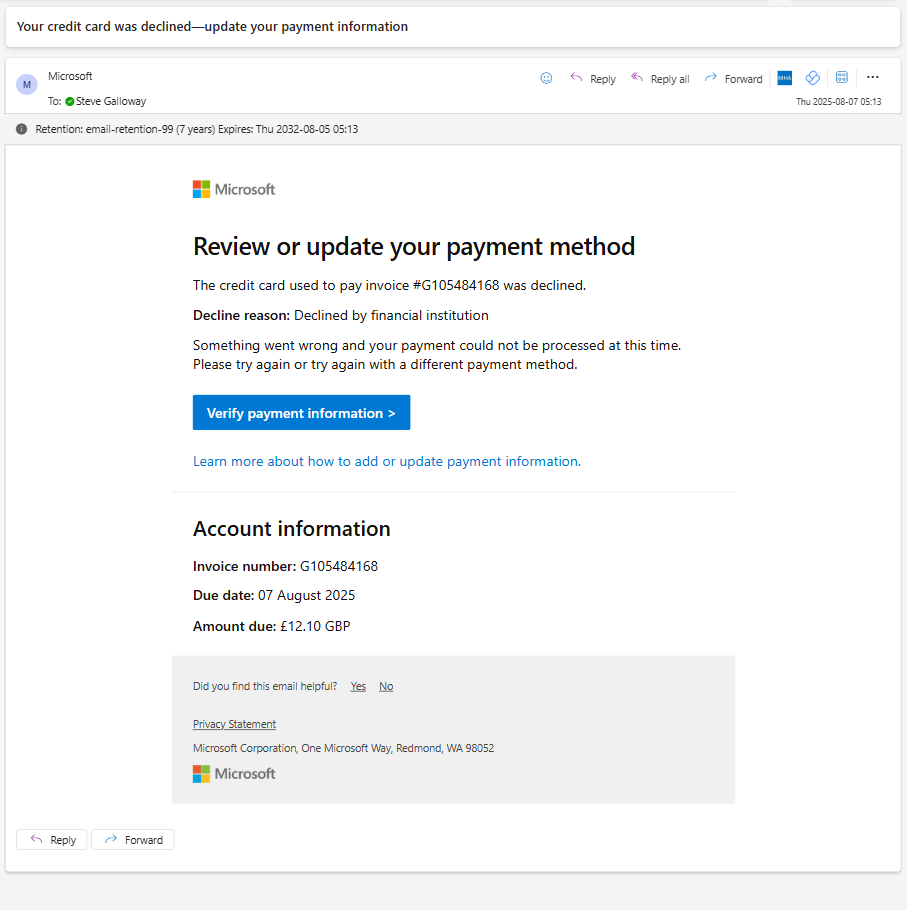
    Phishing is no longer about mass emails with poor grammar. Today’s scams are precise and convincing. Attackers use generative AI to craft messages that mimic real people and companies according to Threatlabz. These emails often target HR, finance, and payroll teams—where sensitive data and money flow.


    phishing attack example

    The only way to tell that this evidently legitimate email from Microsoft is a hoax was to hover over the “verify payment information” link to see that the link was not a valid Microsoft end point.

    Key tactics include:

    • Voice phishing (vishing): Scammers impersonate IT support over the phone.
    • CAPTCHA-protected phishing sites: These look legitimate and bypass basic security.
    • Crypto wallet scams: Fake alerts trick users into giving up credentials.

    Threatlabz goes on to say that even education sectors are under attack, with phishing up 224% in 2024. The goal? Steal data, money, or access to systems.

    AI-Powered Fraud: A New Era of Deception

    AI is changing the game. It helps scammers build fake websites, clone voices, and create deepfake videos [2]. These tools make fraud faster and harder to detect.

    Common scams include:

    • Fake job offers: AI-generated listings lure applicants into sharing personal info.
    • E-commerce fraud: Entire storefronts are built with fake reviews and products.
    • Tech support scams: Attackers pose as IT staff to gain remote access.

    Microsoft reports that AI tools are being used to scan the web for company data. This helps attackers create highly personalized lures.

    Summary

    Customizing folder colours is a great way to help you and others find content easily, especially in large folder lists. Remember, you can also “favourite” a folder to help find your content faster.

    Changing a folder’s colour in OneDrive will only be visible to you.

    Changing a folder’s colour in Sharepoint will be visible to users who you share it to.

    Since Teams stores folders and files in Sharepoint, Teams administrators can change folder colours by opening a Teams’ file library using <View in Sharepoint>.

    Lastly, Sharepoint’s broader capabilities means that advanced users can automate folder properties including folder colours.


    Business Email Compromise (BEC): The Silent Threat

    BEC attacks are rising. These scams involve impersonating executives to request wire transfers or sensitive data according to Socium. AI helps attackers mimic writing styles and internal workflows.

    Watch out for:

    • Lookalike domains: Slight changes in email addresses trick employees.
    • Predictive phishing: AI analyzes past emails to time attacks perfectly.
    • Urgent requests: Messages often pressure staff to act fast without thinking.

    BEC is costly and hard to detect. It’s one of the most damaging threats facing businesses today.

    How to Stay Protected

    Cyber threats are evolving, but so are defenses. Here’s how to stay ahead:

    • Use multi-factor authentication (MFA) across all platforms.
    • Train employees regularly with phishing simulations.
    • Deploy AI-powered email filters to catch suspicious content.
    • Secure mobile devices against smishing and app-based attacks.
    • Consider enhanced security like Conditional Access, which limits access to approved devices.

    Zero Trust principles and advanced threat detection tools are key. They help limit damage even if an account is compromised.

    Summary

    Email threats in 2025 are smarter and more dangerous than ever. AI is helping attackers craft believable scams that bypass traditional defenses. But with awareness, training, and the right tools, businesses can fight back.

    It is difficult to explain the catastrophinc effect that a professional hack on a business has. Even with resources that companies like Marks & Spencer have, a well executed hack brings enormous costs and losses to bear. Worryingly, high profile hacks are only the tip of the iceberg – small business statistically bear the brunt of hacks than any other business class. Nor is it business that any IT professional wants to have to take one. Usually, this is because it was avoisdable in the first place. Talk to us first.

    About ComStat.uk: Internet Service Provider Comstat provides IT support, web hosting, and media services including web design, Microsoft 365 setup, and audio/video production, serving businesses across Denbighshire, North Wales and Wirral from Ruthin, and Lancashire and the Northwest from Bolton.


    Safeguard your .uk domain names – Nominet

    Register an account with Nominet

    Your domain name is a critically important part of your online services and your business identity. Your domain name is how customers find and trust you online. It is the jigsaw piece that has to work every time someone needs to see your website or send you an email. So, your domain name is strategically vital to your visibility and daily operations. 

    Click on the headers below to learn how to use a Nominet account to tighten control of your .uk domain names. Or, skip the sermon, and access Nominet Online Services here.

    Contact us for help.

    Compliance

     UK businesses like yours are responsible for protecting personal data under statutory GDPR provisions. If your domain name is registered through a third party (like a web designer or IT supplier), and you do not have direct access to your domain name’s control panel, you do not know that your registration details are accurate. For instance, when you bought a domain name, were you even thinking about legal title?  This can lead to compliance issues.

    Ownership versus administrative control

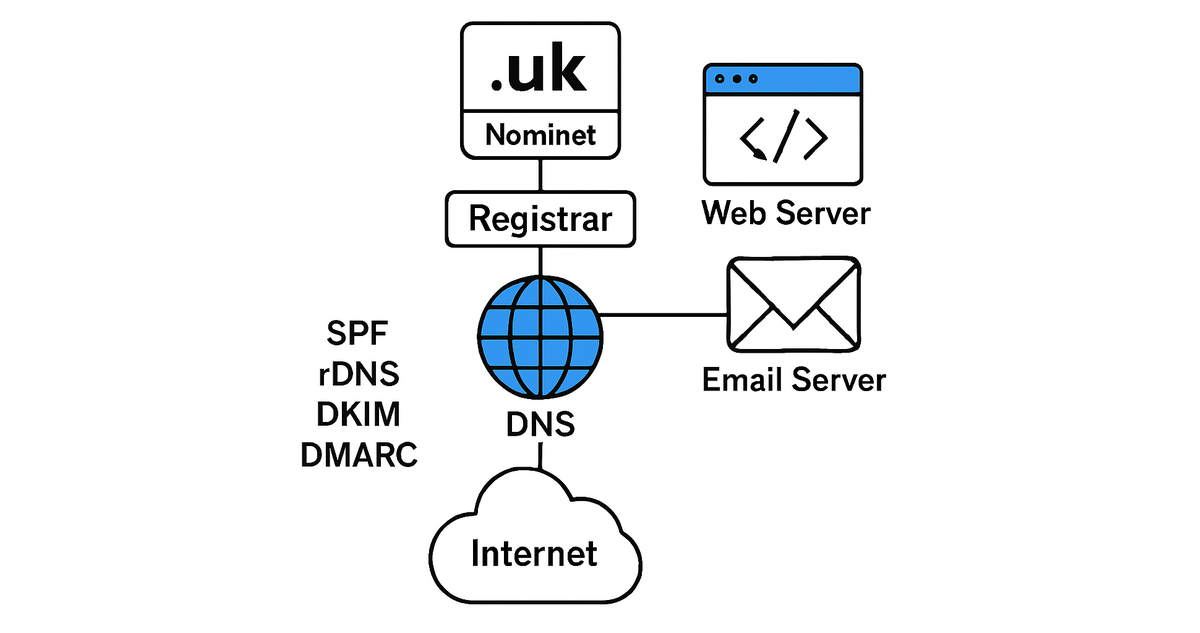
    There are good reasons why owners do not have daily access to their domain name. Domain names are like phone books which direct traffic to the services you need to operate. For instance, email might operate from Microsoft 365, and your web site operates from a server based at Canary Wharf, London. Your domain name controls all of your online services, and inadvertant edits to your records could catastrophically disrupt your services. Even a missing period or full stop could take your IT services down. So, unless you are expert in one of IT’s trickiest technologies – DNS – you need to rely on someone who is.

    This is why, as businesses grow, owners delegate administrative conduct of their domain names to one or more IT professionals. In this situation, the owner stil owns their domain name, but an IT expert can manage the domain name from their own registry agencies. In a way. This allows for rapid intervention in the even of outages or equipment or datacenter failures.

    domain name topology

    Most owners give administrative custody to consultants at Registrar level, but do not secure their overriding rights at Nominet. This is a critical risk.

    However you manage or delegate your domain name, you need a back door so that you have a trump card to change your admin, or transfer the domain name to another registrar. It is not really a matter of trust. An IT supplier might fail. A malicious hacker might gain access to your domain name with the intention of holding you to ransom. It is a matter of security, and therefore GDPR.

    Nominet provides independant access to owners

    Nominet is the not-for profit organistation which governs the operation of .uk domain names – about 10 million domain names at time of writing. You can buy directly through Nominet, however Nominet prefers to delegate daily conduct of new registrations, transfers and renewals to registrars like GoDaddy, TuCows, Enom, OpenSRS, Joker.com and many more. You probably have not heard much about Nominet and that is a tribute to its well regarded behind-the-scenes operations worldwide.

    You probably had an email from Nominet when you bought your domain name asking you for some information. In most cases, we find that this email is ignored. Partly, this is because you might not know who Nominet is. Partly, this is because the domain name bears such an insignificant cost, the effort to seal loopholes seems pointless. 

    Access Nominet Online Services here.

    Protect Your IT assets

    Take advantage of ownership privileges

    Registering an account at Nominet helps you clarify legal title and other information that might not have been properly recorded at point-of-sale. For instance, Nominet might list you as owner because you had to use your name and address to get a credit card to work. However, the domain name should really be the property of a limited company. Owner information is legally binding, so seemingly small details at point of sale can cause problematic and costly issues at law in future.

    Also, although you might need to delegate daily management of your domain names to an IT expert (unless you have a professional IT department), you can still exercise control as owner via your Nominet account. If you do have this kind of control, then your IT experts can transfer your domain name to other registrars who might provide better tools for DNS features that you need. Or, if someone hacks your registrar account and hijacks your domain name, you can resort to Nominet to recover control. 

    This security is overlooked to a worrying degree. Even organizations that puport to be fastidious about IT policy and GDPR rarely act to secure the one IT asset which can cause catastrophic damage to all online services instantly if compromised. 

    Nominet Online Services

    Nominet has a facility that protects your global ownership for .uk domain names – Nominet Online Services.

    Nominet’s online portal allows you to associate domain names that you own with your Nominet account which provides a haven of last resort in situations where a supplier fails, or a malicious entity attempts to hijack ownership of the domain, or other force majeur problems happen.

    By associating your domain name with your own Nominet account, you can manage your data directly and ensure it is handled in line with GDPR requirements. Really, GDPR is not about penal legislation. Rather, GDPR is a framework to help you document what is common sense in the first place.

    This kind of control is essential for business continuity and peace of mind. Access Nominet Online Services here.

    Link Your Domain to Your Nominet Account

    Take Action

    If  you own a .UK domain name, you can associate it with your Nominet account. This gives you full control over your domain and ensures you are protected. Access Nominet Online Services here. This service only operates for .uk domain names, so you could not include a .com domain name in your Nominet protfolio. .com and other domains use other tools to “harden” ownership, and we can give you advice about this if you need to follow this up.

    About ComStat.uk: Internet Service Provider Comstat provides IT support, web hosting, and media services including web design, Microsoft 365 setup, and audio/video production, serving businesses across Denbighshire, North Wales and Wirral from Ruthin, and Lancashire and the Northwest from Bolton.