Configure DKIM in cPanel

Verify outgoing email with DKIM

Use DKIM (DomainKeys Identified Mail) to reduce the chance of your users’ outgoing emails ending up in customer/supplier Spam or Junk folders.
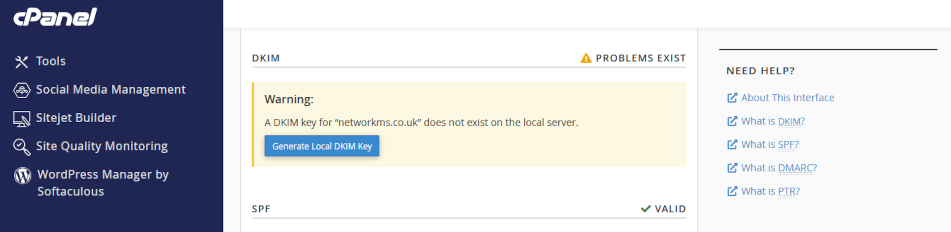
DKIM configuration tool

Click on the headers below to follow our guide to configure DKIM using cPanel WHM and post your DKIM records in your domain name’s zone record at your domain registrar. Click on images to see in full resolution.

How to prepare

DKIM is already enabled on your web server. However, the service needs to be implemented. This is because the verification process requires checking a unique DKIM record which only you can add to your domain name’s “phone book” – we call the phone book a zone record. If we have ongoing access to your domain name, we would take care of this as part of the support we provide.

Before starting, you will need to understand where your domain name is managed. If your domain name is held at a domain name supplier using their nameservers, you will need to create DKIM records in the zone record at your supplier. If you own the domain, but we hold it in our management portfolio, then you might only need to make amendments in cPanel which will make things easier.

Therefore, before you proceed, prepare as follows:

  1. if in doubt, check with us where your records need modifying
  2. find your cPanel login credentials from our server information sheet
  3. (optionally) find the login credentials for your domain name supplier

We are able to manage domain names on behalf of clients. Domain name management is a critical function and unwitting errors can cause email and web site failure. If you are nervous about dealing with this technology, we can provide admin support – ask for help. For instance, if you do not have in-house expertise, we can take administrative custody of your domain to manage these kinds of jobs.

Step-by-Step instructions

1. Log in to WHM:

2. Access the DKIM Settings:

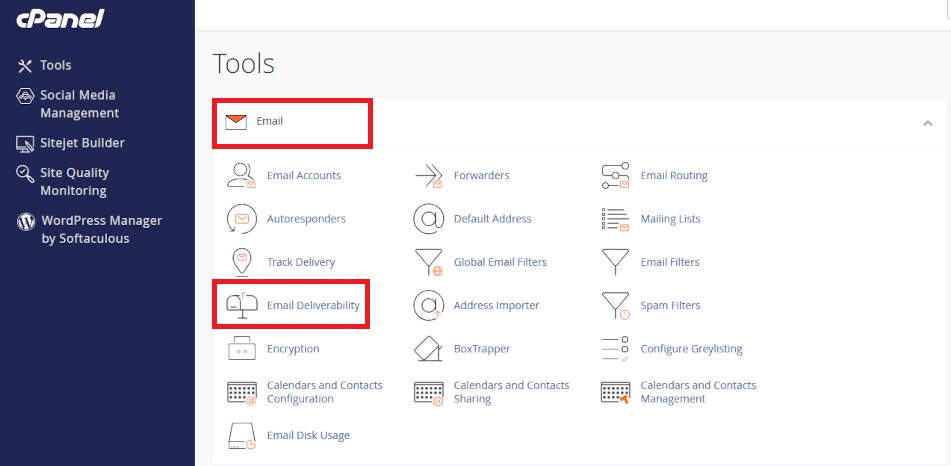
  • In the WHM dashboard, search for <Email>.
  • Click on <Email Deliverability>.

dkim configuration module

3. Select the Domain:

  • Choose the domain you want to configure DKIM for.
  • Click <Manage> next to the domain.

4. Enable DKIM:

  • In the DKIM section, click <Install the Suggested Record>.
  • WHM will automatically generate the DKIM record.

5. Copy the DKIM Record:

  • After generating the DKIM record, you will see a TXT record.
  • Copy the entire TXT record, including the v=DKIM1; part.

6. Log in to Your Domain Registrar:

  • Open your domain registrar’s website.
  • Log in with your credentials.

7. Access DNS Management:

  • Find the DNS management or zone file settings.
  • This section allows you to add or edit DNS records.

8. Add the DKIM Record:

  • Add a new TXT record.
  • In the Name field, enter the selector and domain (e.g., default._domainkey.yourdomain.com).
  • In the Value field, paste the DKIM record you copied from WHM.
  • Save the changes.

9. Verify the DKIM Record:

  • Go back to WHM.
  • In the <Email Deliverability> section, click <Manage> next to your domain.
  • Click <Check> to verify the DKIM record.

10. Test Your DKIM Setup:

  • Send a test email to ensure DKIM is working.
  • Use online tools like DKIMValidator to check if your email passes DKIM checks.

Tips for Non-IT Users

  • Take Your Time: Follow each step carefully.
  • Ask for Help: If you get stuck, don’t hesitate to ask your registrar’s support team.
  • Double-Check Entries: Ensure there are no typos in the DKIM record.
Summary

Business users do not have a lot of patience when it comes to email, and not a lot of people check Spam or Junk occasionally if at all. Email that is lost in this way costs business so DKIM, along with SPF (automatically configured for you already, DMARC, and Reverse DNS are necessary utilities for providing resilient email delivery.

Making adjustments to your domain name’s zone record requires exacting language and syntax. A missing character can cause a web site to cease functioning and disable your organisation’s email. Nor can you test a modification first – changes made have effect in real time.

Expert help available

We have decades of experience managing domain names on behalf of clients. If you are nervous about dealing with this technology, we can provide admin support for domain names and ongoing services – we can turn modifications in minimal time at reasonable cost and while saving you from risk of web site and email disruption – please ask for help if in doubt.
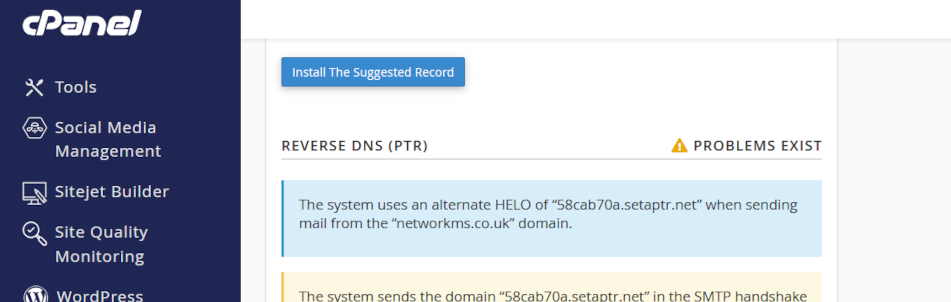
Configure Reverse DNS (RDNS)

Reverse DNS

Reverse DNS, also called rDNS, is used by email servers to verify your email has reached it from an email server and IP address that you own. rDNS is crucial for email deliverability and server reputation. For instance, web site contact forms often fail because Reverse DNS is not configured properly and emails are dropped before reaching a web site owner’s Inbox. This is why SPF, rDNS, DKIM, and DMARC are so important in business email.

Reverse DNS

Your web server’s zone record is already configured to a rDNS mapping so you should not need to intervene unless you are operating exceptional circumstances.

Click on the headers below to follow our guide to record a Reverse DNS/PTR record in your domain name’s zone record at your domain registrar. Click on images to see in full resolution.

How to check rDNS is configured

At the moment, your web server already resolves rDNS, and the record posted in cPanel > Email > Email deliverability should already resolve to:

  • Name: 10.183.202.88.in-addr.arpa.
  • Value metal1.namesfirst.net.

Note that the IP address is recorded in the <Name> field. This is usually illegal logic, and that is why this record has to be specially handled by the owner of the IP address block your server relies on: it requires a “reverse” entry which means it has to be handled at “datacenter” level.

rDNS is a not always an easy DNS feature to deal with. Please contact us for advice if you are in doubt about your server configuration.

Summary

Reverse DNS is an important tool that remail servers rely on to verify that email you send is recognized as valid. Without this validation, you may send email that is rejected or dropped before it reaches a recipient’s Inbox.

Making adjustments to your domain name’s zone record requires exacting language and syntax. A missing character can cause a web site to cease functioning and disable your organisation’s email. Nor can you test a modification first – changes made have effect in real time.

Expert help available

We have decades of experience managing domain names on behalf of clients. If you are nervous about dealing with this technology, we can provide admin support for domain names and ongoing services. We can turn modifications in minimal time at reasonable cost while saving you from risk of web site and email disruption – please ask for help if in doubt. 

Why Authoritative Nameservers Matter for Your Web Hosting Setup

Introduction

Use this article to understand how a domain name relies on authoritative namservers to connect web site viewers and email users to your web server. This article is intended for Comstat.uk clients who have bought domain names elsewhere who intend to maintain the domain names in their own portfolios. This requires more client input and can delay restoration of services in the event of outages.

If you maintain your domain names within ComStat.uk’s management portfolios we can provide streamlined support because we can access your domain names’ zone records 24/7 without recourse to clients. This means we can fix authoritative nameservers without reverting to you.

For instance, in the event of an outage while you are away on holiday, or you cannot access your domain name control panel because you have no phone signal to handle 2FA, your web site service could be disrupted until someone can get to your domain name control panel to resolve problems. So, it is important to understand how your authoritative nameservers operate and who is repsonsible for the dashboard that manages them.

Click on the headers below to find out about how to decide where to locate your authoritative nameservers. Click on images to view at full-sized resolution.

What are Authoritative Nameservers?

Authoritative nameservers hold the definitive records for a domain name that operate your email, website availability, and other services. Conventionally, two or more authoritative nameserves are in operation in case one server fails. Authoritative nameservers answer queries about domain names with the most accurate and up-to-date information about your web site, email server, and more.

For instance, if you want to send an email, your computer has to find your authoritative nameserver to find out how to send your outgoing email. Also, it has to find where to send the email. Lastly, the receipient’s email server has to verify that email is legitimate, so it is critically important that your authoritative nameservers are operational and capable of demonstrating a good “score”. If your authoritative nameservers are not recognised and do not achieve adequate safety metrics, your emails will be dropped or sent to spam.

Authoritative nameservers work behind the scenes to translates domain names (like comstat.uk) into IP addresses (like 192.0.2.1). To read this article, your computer had to find where the web server was that hosts the page you are reading. Often, a web site operates from one server, and email from another. Authoritative nameservers define where your services are established. 

Using a domain name supplier's Authoritative Nameservers

When you buy a domain name your domain name supplier will provide standard authotitative nameservers which point to your domain name’s “zone record” – a phone book – which describes where your web site is, and where your email server is. Also, it provides room for you to define records to help prove that your email is legitimate and many more things. It is important that it is secure, and safe from malicious hijack. 


Pros:

  •  Reliability – good security, robust global availability

Cons:

  • Limited control – limited customization options
  • Dependency – you rely on the registrar for DNS management
  • Manual entries – records have to be transcribed from your cPanel zone record (e.g. webmail.domainname.com)
  • Complexity – different suppliers adopt differing methodologies for scripting records
  • Resolution – some suppliers take up to 72 hours to resolve DNS
Using your web server for Authoritative Nameservers

When you use your web server as your authoritative nameservers, you modify records at your domain name supplier so that your web server become your authoritative nameservers. This is easy to do: you replace the standard nameservers in your domain name’s control panel with your web server’s nameservers which we will establish for you. For instance, we use nameservers like ns1.namesfirst.net and ns2.namesfirst.net. Once the nameservers are modified, all records dealing with your web site, email, webdisk, etc., are handled via cPanel.


Pros:

  • Control – you/we can make changes instantly
  • Integration – seamless integration with your email, web site, etc.
  • Customization – you can tailor DNS to specialized needs
  • SSL – cPanel can automatically align SSL certificates with your web server

Cons:

  • Security – teh onus is on the web server owner to protect against intrusion
Summary - which one?

Entry level web hosting services do not do much more than provide a web site, and email is usually bought as a separate service. As businesses outgrow entry level web hosting, the realities that larger business face become more evident.

If you operate a web site via cPanel which includes email, and you intend to use services like Webdisk and automated SSL, it is probably less effort to use your web server as an authoritative web server.

If you want to provide extra security against a malicious person hacking your authoritative nameserver, consider managing things at your domain name supplier. This will mean copying records from cPanel however, and may limit how your SSL certificate works. Also, our ability to restore services in the event of authoritative nameservers depend on us being able to reach you.

In some cases, we also manage authoritative nameservers for clients at Cloudflare and Microsoft 365. Both provide Enterprise grade suecurity and resiliency. How your email and website are organised influences how we need to deal with your authoritative nameservers.

Without a working authoritative namserver, web sites, email, and more cease to work. So, at some point businesses have to develop in-house skills or outsource help to manage this critical Internet technology.

To discuss how best to manage your domain name and how best to establish your authoritative nameservers, contact us using the WhatsApp link or arrange a convenient time for us tr contact you via our contact page.