Browser Pop-up Scam: Why Fake Virus Warnings Appear Even When Your Computer Is Clean
It is alarming when a your computer's desktop screen suddenly starts displaying warnings like:
- "Trojan Virus Found!"
- "Your device is infected."
- "Click here to remove viruses now."
Sometimes, a third and perhaps even more pop-ups appear. This causes panic. The instinctive reaction is often to assume the computer has been infected with malware. In many cases, however, the problem is not Windows itself. Instead, the culprit is a browser notification scam. When this happens, your web browser has been hijacked.
At ComStat.uk, we recently investigated a case where repeated "Trojan detected" warnings appeared whenever Mozilla Firefox was opened. Antivirus and anti-malware scans reported a clean system, yet the warnings persisted until the hijacked browser permissions were removed.
The good news is that this type of threat is usually much easier to resolve than a genuine malware infection.
Click open the sections below to find out what browser po-up scams are and how to rectify this kind of problem.
What Is a Browser Notification Scam?
Modern web browsers including Firefox, Google Chrome, Microsoft Edge and others allow websites to send notifications directly to your desktop.
This is a legitimate feature designed for services such as:
- Email alerts
- Calendar reminders
- News updates
- Messaging platforms
When visiting a website, you may see a prompt asking:
Allow notifications?
If permission is granted, that website can continue sending notifications to your device even after you close your browser. Mozilla's Support page explains how browser notifications (or pop-ups) are intended to work for your benefit.
The browser pop-up scam
Fraudulent websites exploit this feature by displaying alarming messages intended to scare users into taking action.
Examples include:
- Fake virus alerts
- Fake security warnings
- Fake Windows updates
- Fake software licence expiry notices
- Fraudulent technical support messages
The notifications, like this trio below, may look convincing because they are displayed through the operating system's normal notification mechanism.
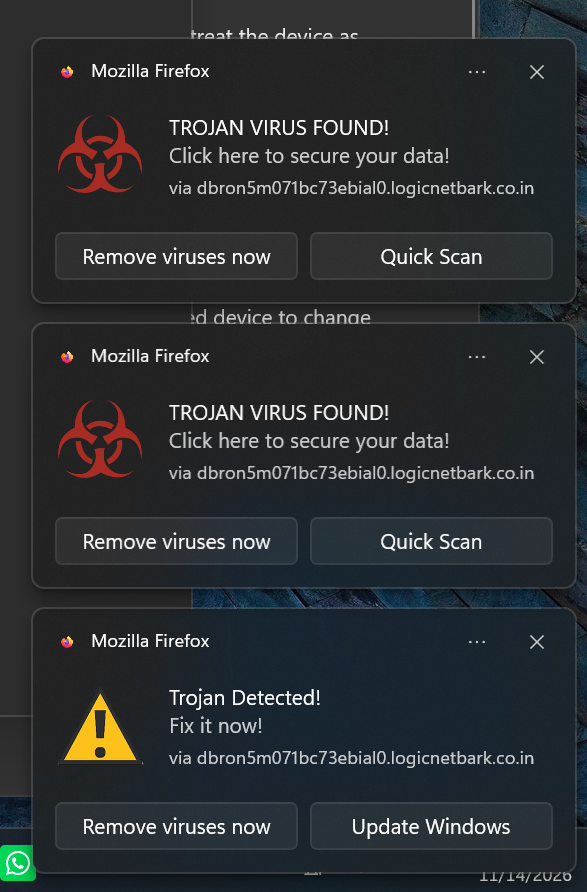
Browser pop-up scams are caused by problems in your web browser, so escape virus scans in your operating system. These usually Appear towards bottom right of your screen.
How a browser pop-up scam works
A browser pop-up scam typically attack follows this pattern:
- You visit a website.
- The website asks for notification permission (not always obviously).
- You click "Allow" in some way, often without realising the implications.
- The website registers a background service within your browser.
- Notifications/pop-ups start appearing on your desktop.
Deception is intentional
Browser pop-up scam notifications are designed to deceive you. The messages are deliberately designed to create urgency and panic. Typical wording includes:
- "Trojan Virus Found"
- "Immediate action required"
- "System infection detected"
- "Your data is at risk"
Often, multiple pop-ups will appear on your desktop. This is perhaps the easiest clue to be aware of.
The hackers' objective is to persuade you to click a button before you have time to think critically about the warning. Often, the pop-ups will purport to be generated by a software application you trust, like Microsoft, and sometimes coincidentally your antivirus software provider. This deception is intended to trick you.
What Are Criminals Trying to Achieve?
The visble scam visuals are usually only the first stage. The ultimate goal may be to
Steal Personal Information
- Users may be directed to fake Microsoft, Google, banking or email login pages designed to harvest passwords.
Install Malware
- Some links encourage users to download "security tools" that are actually malicious programs.
Trick Users into Paying for Fake Services
Fraudsters frequently advertise:
-
- Fake antivirus products
- Bogus system cleaners
- Fraudulent support subscriptions
Gain Remote Access
Some notifications direct users to call a "support number" where criminals attempt to persuade victims to install remote-access software such as AnyDesk, TeamViewer or Supremo.
Once connected, attackers may gain access to:
- Personal files
- Saved passwords
- Online banking sessions
- Business documents
- Email accounts
Case Study: Firefox "Trojan Virus Found" Notifications
In a recent real-world example we rectified, multiple security warnings appeared immediately after Firefox was launched.
Browser pop-up scam symptom
The notifications claimed:
Trojan Virus Found
and encouraged the user to click:
- Remove Viruses Now
- Quick Scan
- Update Windows
Browser pop-up scam diagnosis
- Windows was not infected.
- McAfee Business Protection antivirus software reported no infections.
- Malwarebytes anti malware software reported no infections.
- The notifications/pop-ups originated from a suspicious domain name unrelated to Mozilla.
- The website associated with the domain name had been granted notification permissions inside Firefox.
- The pop-ups only started AFTER opening Mozilla Firefox.
Removing the malicious notification permission and associated service worker resolved the issue completely.
Although this case involved Firefox, the same attack technique is commonly used against Chrome, Edge and other modern browsers. Also, a browser pop-up scam may be implemented to run even if a browser has not been opened.
Signs That a Virus Warning Is Fake
Be extremely cautious when you notice:
Unknown Domains
- Legitimate warnings do not originate from random websites with obscure domain names.
Pressure Tactics
- Messages that urge immediate action are designed to discourage careful thinking.
Unexpected Notifications
- If you are not actively running a security scan, be suspicious of any website claiming to have found malware.
Requests to Call Support
- Microsoft, Mozilla and antivirus vendors do not display browser notifications instructing you to telephone a support number.
Requests for Payment
- Any "security alert" demanding immediate payment should be considered suspicious.
How to Remove Browser pop-up Scams
The steps vary slightly between browsers. Also, as web browsers update with new versions, browser settings and headers/locations can change. The general process is similar, though, and follows these lines:
Google Chrome
- Open Settings.
- Navigate to Privacy and Security.
- Select Site Settings.
- Open Notifications.
- Remove or block unrecognised sites.
Microsoft Edge
- Open Settings.
- Select Cookies and Site Permissions.
- Open Notifications.
- Remove suspicious entries.
- Restart the browser.
Mozilla Firefox
- Open Settings
- Navigate to Privacy & Security.
- Locate Notification Permissions.
- Remove any unrecognised websites.
- Review Service Workers and remove suspicious entries.
- Restart Firefox.
Note: these are basic guidelines. Although this should kill the process, traces of the browser pop-up scam may still be lodged in browser settings. You should contact us for professional support to avoid risk to your personal data.
Why Antivirus Software May Report a Clean System
This often confuses users. For instance, you have pops persistently appearing on your secreen. Every time you try to delete one or more pop-ups, one or more new pop-ups appear. Meanwhile, your anti-virus software says your computer is clean.
In many cases:
- Windows is operating correctly.
- The browser is operating correctly.
- Antivirus software is operating correctly.
Yet the pop-ups do not stop. Something must be wrong. How can this be?
Browser infiltration, not Windows infiltration
The issue is simply that a website has been granted permission to display notifications. From a technical perspective, the browser is doing exactly what it was instructed to do. If the browser could not accept incoming instructions this way, you probably would not be able to sign into your banking service. Scammers abuse this utility to infiltrate your browser's security.
So, the challenge is that the permission was granted to a malicious or deceptive website when a malicious web site was visited. At some point, you agreed to to something which gave your browser permission to accept the remote web site's incoming instruction.
Antivirus software does not scan for pop-ups
Another way to look at this is that because notifications (or pop-ups) is a conventional browser utility that has been invoked following an affirmative instruction from you (even unwittingly), antivirus and anti malware software consider that the browser pop-up scams were approved.
How to Prevent Future Incidents
To reduce the risk of future problems: These kinds of problems catch out the most diligent people. There are some thing you can do to reduce risk of a browser pop-up scam entrapping you:
- Only allow notifications from sites you trust.
- Decline notification requests from unknown websites.
- Keep browsers updated.
- Use reputable security software.
- Review notification permissions periodically.
- Avoid clicking on alarming pop-ups that claim immediate action is required.
For many users, disabling notification requests entirely is the safest option.
Conclusion
Fake virus alerts generated through browser pop-ups have become a common online threat. The pop-ups mimic genuine security warnings. They are usually designed to steal information, install malware, obtain payment or persuade users to surrender remote control of their devices.
The reassuring news is that these warnings do not necessarily indicate a compromised computer. In many cases, the solution involves removing a malicious website's notification permissions from the browser rather than repairing Windows itself.
If suspicious warnings continue to appear despite antivirus scans reporting a clean system, examining browser notification permissions should be one of the first troubleshooting steps.
Frequently Asked Questions
Is my computer infected if I see "Trojan Virus Found" notifications?
Not necessarily. Many fake virus warnings originate from browser notification permissions rather than malware installed on the computer itself.
Why does my antivirus say my computer is clean?
Because no malicious software may actually be present. The browser may simply be displaying notifications from a website that was previously granted permission.
Can browser pop-ups steal my personal information?
The pop-ups and notifications themselves usually cannot. However, they often direct users to fraudulent websites designed to steal passwords, banking details or other sensitive information.
Are Firefox, Chrome and Edge vulnerable to this scam?
Yes. The attack abuses a standard browser feature rather than a specific vulnerability. Any browser that supports website pop-ups and notifications can potentially be affected.
Should I click "Remove Viruses Now" or similar buttons?
No. Close the notification and investigate the source instead. Clicking such links may lead to phishing pages, unwanted software installations or technical support scams.
How can I stop this happening again?
Avoid allowing notifications from unknown websites, periodically review browser permissions, and keep your browser and security software up to date.
Should I seek professional help?
These guidelines are minimally adequate, however every browser pop-up scam is constructed in its own way and we advise you seek professional help to ensure traces of a browser pop-up scam are eliminated from browser settings to purge any risk from your browser. Use out contact page for help.
About the Author
Based in Ruthin, North Wales, Steve Galloway helps businesses improve reliability, productivity and security through practical IT support, Microsoft 365 expertise, web server and web hosting support, troubleshooting and documentation. Find out more about Steve Galloway and his experience here.